
About DysCalculator
A calculator designed for people with dyscalculia.
Dyscalculia is a neurodiverse learning difficulty that affects a person’s ability to understand, remember, and manipulate numbers and mathematical concepts. It is often referred to as “maths dyslexia” and can manifest as difficulties with basic arithmetic, understanding time, using money, and comprehending mathematical concepts and formulas. This condition varies in severity and often requires tailored educational strategies and interventions to help individuals manage and overcome their challenges.


Getting started
Use the keyboard to enter the formula to be calculated. The answer will be displayed immediately.
For example:

Gives:

- Press the ▲ Shift key to access additional operations on the keyboard.
- Press the ⚙ Settings key to access settings, including these instructions.
Customisation
Optional customisations in DysCalculator:
- Customisable greeting with the user’s name.
- Press and hold on “Hello Friend”, then enter your name.
- Custom key labels such as “plus” and “and” for addition key.
- Press and hold on any key, then enter the label for the key.
- Irlen shading to improve legibility of keys and values.
- Go to Settings, then choose from the Irlen menu.
- OpenDyslexic font to assist people with dyslexia.
- Go to Settings, then toggle Use accessibility font.
- Multiple language support including Te Reo Māori.
- Go to Settings, then choose from the Language menu.
Calculations
Fractions
You can perform calculations using fractions with the ˣ⁄y key.
Type the fraction with the numerator (top number) followed by the denominator (bottom number).
Example:

Gives:

To add another fraction, use the operator keys and add the next fraction.
For Example:

Gives:

To enter a mixed fraction, use the fraction key again.
For Example:

Gives:

Time durations
You can perform calculations in hours, minutes, and seconds using the Hrs and min keys.
For example, to calculate the duration of eight lots of twenty minutes:
Gives:

To enter a value in seconds, enter the number of seconds then the sec key.
For example, for thirty seconds:

Gives:

For example, if a heart beats twenty-three times in fifteen second, then the heart rate in beats per minute can be calculated as:

Gives:

Time with the clock
To perform calculations using clock time, you also use the ⏱ key.
For example, to enter a time in the morning (a.m.), press the ⏱ once:

Gives:

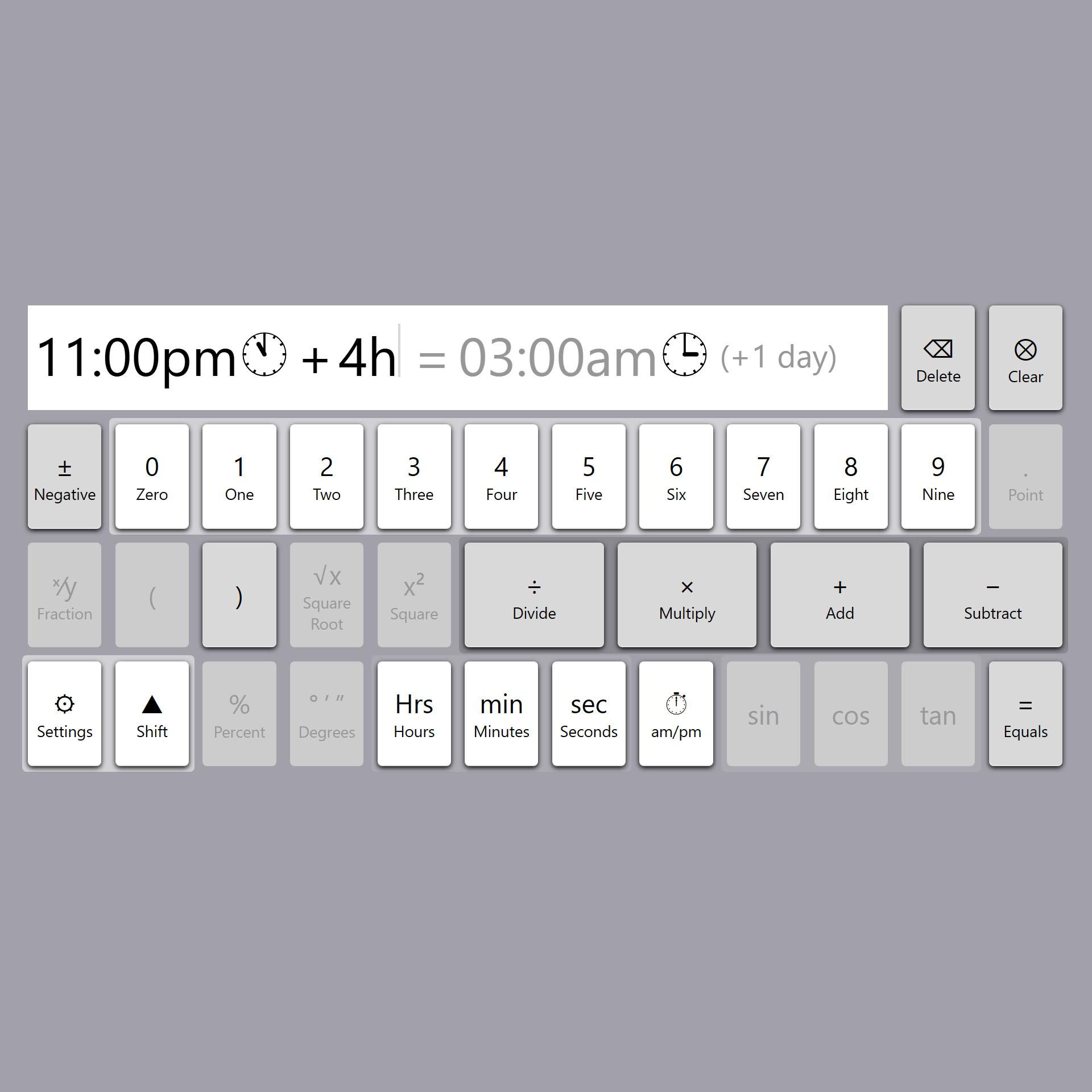
To enter a time in the evening (p.m.), press the ⏱ twice:

Gives:

To calculate four and a half hours after eleven o’clock at night:

Gives:

Percent and tax
You can perform calculations with percentages using the % key.
For example, to add five percent to thirty:

Gives:

To find eight percent of forty:

Gives:

The Tax key can be used to calculate pre- and post-tax amounts.
- Configure the tax amount in the ⚙ Settings dialog.
For example, to add tax to a $200 pre-tax amount:

Gives:

To remove tax from a $230 after-tax amount:

Gives:

Features
DysCalculator has been designed to support learners with neurodiverse needs and offers a range of features.
Logical arrangements with numbers ordered by their magnitude, from 0 to 9.

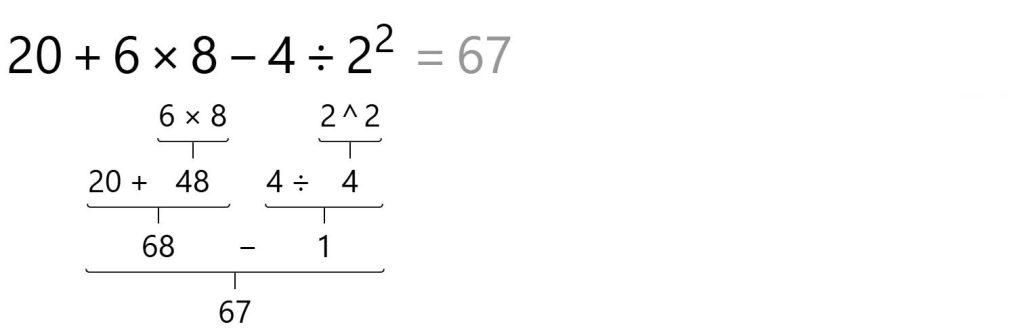
Operators arranged according to precedence, following the PEMDAS (also known as BODMAS) rule: parentheses (brackets), exponents (orders, powers, roots), division / multiplication and addition / subtraction.

Natural-order entry for unary and binary operators.



Expressive display
Formula field that shows the entire calculation with real-time evaluation.
Thousands separator.

Expressive display of fractions and time.

Percentages are calculated using idiomatic phraseology.

Calculate pre-tax net amounts for gross cost.
Trigonometric functions can work in degrees or radians.


Show working
Tap on the formula to reveal a window showing the working steps used to reach the final answer. This is useful to see the precedence order of operations.